Your Autotask records should show the person behind the work, not just the integration account that made the API call.
When an MSPintegrations workflow creates a ticket, note, attachment, or other Autotask record, Autotask identifies the creator from the API request. Until now, our direct Autotask API actions ran as your MSPintegrations API user. That meant Autotask attributed the result to MSPintegrations even when a technician’s email, decision, or work was what actually triggered the workflow.
That attribution was technically accurate, but it did not always tell your team the most useful story. Someone reviewing a ticket later could see the integration account as its creator instead of the person who initiated the work.
Our email-oriented Autotask workflow actions already try to solve this automatically. When an email sender matches an Autotask resource, those actions opportunistically impersonate that resource. Workflow designers can now bring the same accurate attribution to direct Autotask API actions by choosing which resource the action should impersonate.
Open the action’s Advanced section and select an active resource under Impersonate Resource. For dynamic workflows, unlock the field and use an expression that resolves to the Resource ID of the person who initiated the action.
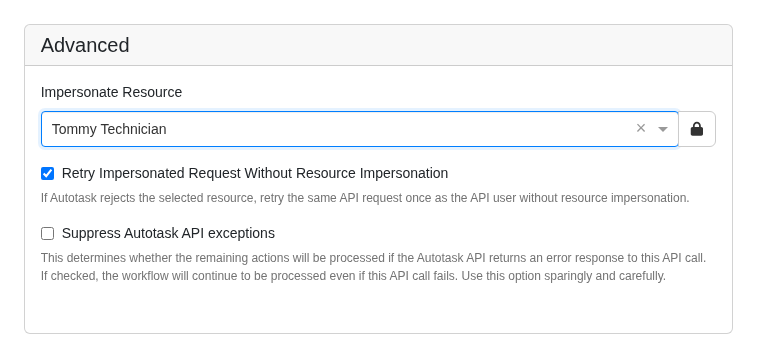
For example, if Tommy Technician takes an action that triggers a custom workflow, the ticket, note, or attachment created by that workflow can now appear in Autotask as created by Tommy Technician instead of your MSPintegrations API user. Your Autotask history more accurately reflects who performed the work, who initiated the process, and why the record exists.
Resource selection is available for direct API actions that create, update, query, query one, delete, and create attachments. This gives workflow designers control over attribution wherever these low-level actions are used.
Autotask can reject an impersonated request when the selected resource is not permitted to perform the operation. To keep your automation moving, Retry Impersonated Request Without Resource Impersonation is enabled by default. If impersonation fails, MSPintegrations records a warning in workflow history and retries once as the API user. Disable the fallback when the action must run as the selected resource.
Before using this feature, confirm that the Autotask security levels for both the API user and the selected resource allow resource impersonation. Autotask continues to enforce its normal permissions for the requested operation. See our Autotask impersonation guide for configuration details and the complete list of supported actions.
Resource impersonation is available now in all production regions for customers using Autotask direct API actions. Give it a try and let us know how you are using it in your workflows.