Hi @Bret ,
The basic steps for your use-case are the same as @KeithTessler 's workflow, but you’ll first need to extract the phone number from the subject line of your email.
Assuming the phone number in the subject is always at the end of the subject line, and is always 10 characters long, you can use this regular expression:
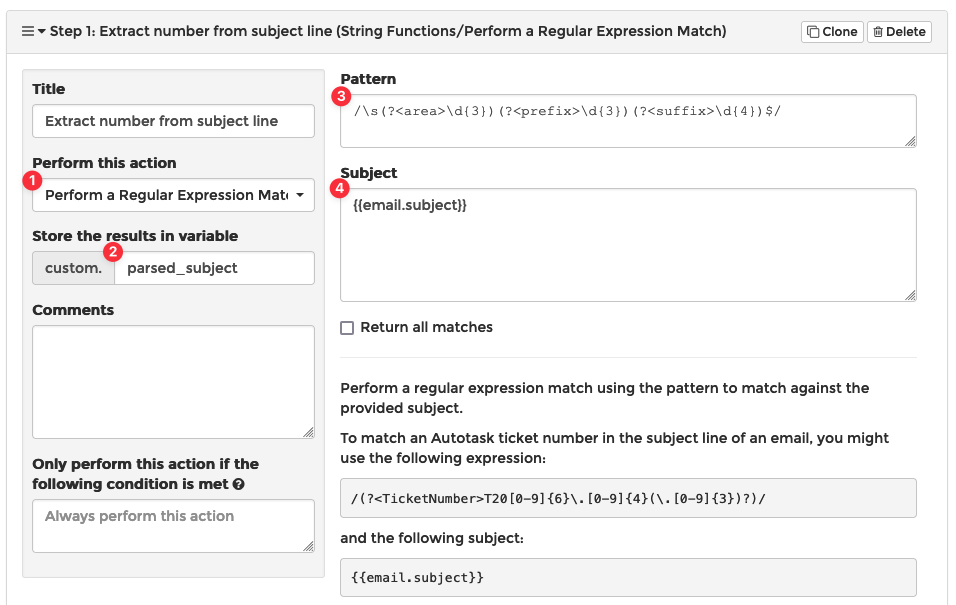
/\s(?<area>\d{3})(?<prefix>\d{3})(?<suffix>\d{4})$/
You can see the regex in the sandbox tool I use: regex101: build, test, and debug regex
This regex will extract 10 numbers at the end of the subject line as long as they are preceded by at least 1 white space characters. It will extract the number into 3 groups: the area code, prefix, and suffix.
In MSPintegrations, you can use the regular expression like this:
Let us know how it goes!