Admittedly it’s a little hacky but is tested and working with the only Addition and Subtraction functions available to us, Dates.
First render a custom.ZeroValue as {{date “0000-01-01 00:00:00”}}
Yes a year of 0000 does work, and we will use the years portion of the date as our numerical value.
To add a number, render custom.NumberDate as “custom.BilledHours years”, and then add them together with another render of {{date custom.ZeroValue add=custom.NumberDate}} saving the output to custom.RunningTotal. Repeat for as many numbers as you want to add, assumedly in an Iterate step.
To compare the RunningTotal to another value, simply render that as a date in the same way {{date custom.ZeroValue add=custom.CompareValue}} and use the Boolean expression builder conditions to compare the RunningTotal and CompareValue.
Or render the numerical result (assuming the total is less than 10k, with {{date custom.RunningTotal to_format=“Y”}}.
If your totals will be larger than 10k and you only need them for comparison conditions, use seconds instead.
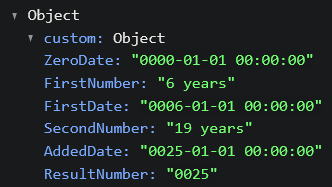
The variable names are different in my test, but I’m sure you get the idea.