When you use a tool like MSPintegrations to automatically import emails into tickets in your PSA, you quickly notice how many emails contain the same signature images: social media icons, company logos, and so on. In a long email thread, those images can show up over and over in the ticket’s attachments. They add no value to the ticket and do not help the technician reviewing it.
Over the years, many of you have asked us how to suppress these images. You’ve suggested filtering by file size or filename, or excluding images from the signature section of the incoming email. None of those approaches has proven to be a reliable way to distinguish signature clutter from an image your technician actually needs.
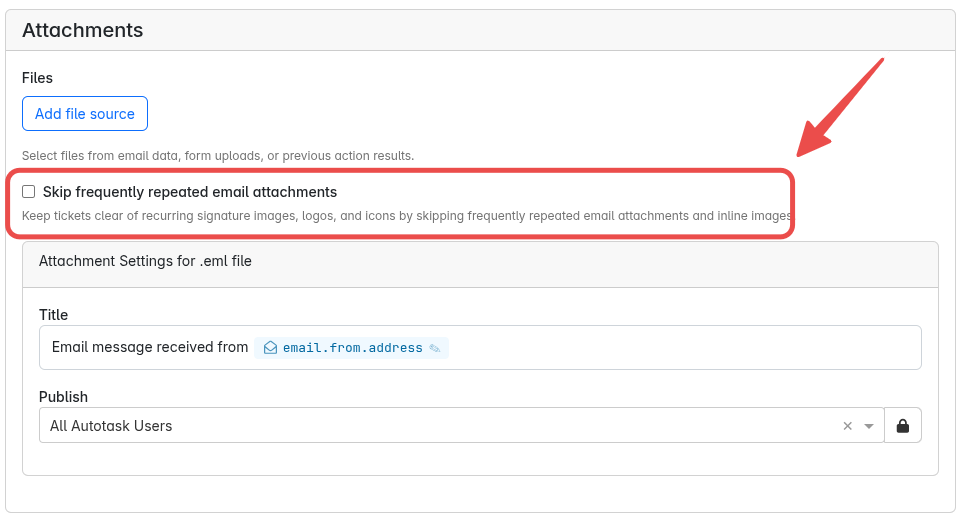
So we implemented frequency-based filtering. After offering it to customers who requested early access and hearing your feedback, we are making Skip frequently repeated email attachments generally available for our Autotask attachment actions. You no longer need to ask us to enable access for your organization.
How It Works
MSPintegrations tracks a fingerprint, called a hash, of the file content attached to your Autotask tickets and other records. That lets the system recognize the same image even when it arrives with a different filename.
The previous Prevent duplicate attachments option kept the same file from appearing repeatedly within a single ticket. That helped with long email threads, but the same signature image could still clutter many different tickets.
The new feature takes a broader view. When you enable it, the system looks for repetition across your organization and across the MSPintegrations platform. A file can qualify because it appears frequently within your organization, or because it appears much more widely across the platform. It does not have to repeat within the same ticket.
Once a file qualifies as frequently repeated, actions with this option enabled skip it instead of attaching it to more Autotask records. For example, a common social media icon can qualify through platform-wide repetition before it has appeared frequently in your own organization’s tickets.
Rather than trying to guess where a signature starts or which filenames belong to social media icons, the system looks at repetition. Your technicians have less attachment clutter to work through, making the screenshots and other files they need easier to find.
The filter applies to original email attachments and inline images of any file type, not just images. Repetition is the criterion, so it can also skip a frequently repeated document. It does not remove anything already attached to your PSA records.
Your Existing Setting Carries Forward
Skip frequently repeated email attachments replaces the previous Prevent duplicate attachments option. If you already enabled that option in an action, the replacement remains enabled there. You do not need to reconfigure those actions.
If you did not previously enable it, open the Attachments section of your Autotask action and enable Skip frequently repeated email attachments. Check both the actions that create tickets and those that add replies.
See the attachment settings documentation for configuration details.
Thanks to everyone who asked for this, tried it, and shared feedback. Please let us know how it works for you, especially if it skips a file you wanted to keep.