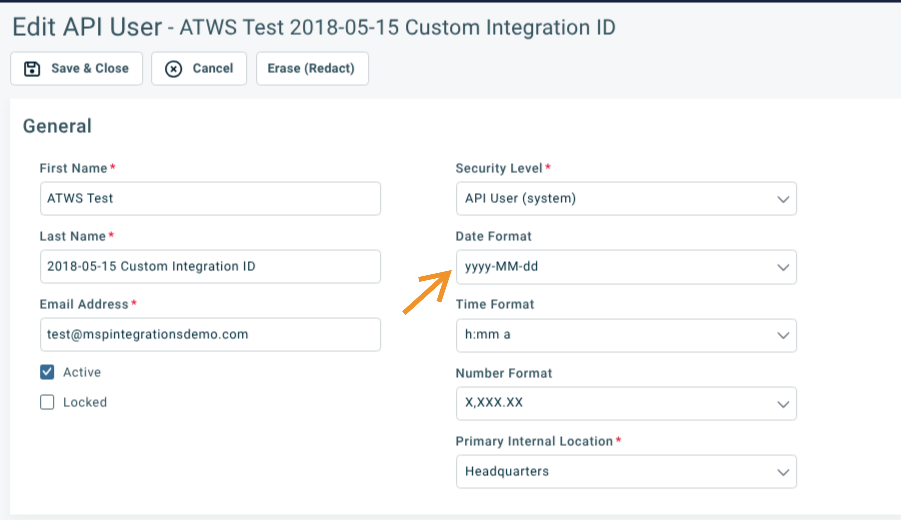
The Autotask API has some oddities and inconsistencies. One thing that’s odd is that all date fields are returned in a standard format, but UDFs that contain dates are always formatted according to the date format of the Autotask API user.
You can easily work around this by editing the API user in Autotask. Change the date format to match the ISO format:
Thanks Travis. I guess it does make sense that AT would display the date according to the user’s preference. Also makes sense that when we pull a date from AT we shouldnt need to worry about what format it comes in.
I think the thing that tripped me up was that I specified the format in MSPI as DD-MM-YYYY, whereas it appears the correct syntax is d-m-Y. Correct me if I’m wrong.
All dates in the Autotask API are always formatted YYYY-MM-DD HH:MM:SS (ISO standard time), EXCEPT dates stored in UDFs. Dates stored in UDFs are formatted to match the format set by the Autotask API user. In my opionion, all dates in the API should always be formatted ISO standard, but Autotask acts differently for dates that are UDFs and that are not.
I recommend you change the Autotask preference to be YYYY-MM-DD, then remove the to_format argument when using {{date ...}}. This will format is in ISO format.
If you want to take a date and store it in a string (as part of a ticket title, for example), then use the to_format argument to change it to a friendly format.
You can represent it like this and it will render exactly the same:
{{date to_format=“dd-mm-yyyy”}}
You don’t need to include add, subtract, from_tz, to_tz, etc.
As I said earlier, I would remove the to_format. I do recommend you include to_tz="Autotask" if storing in Autotask. You can read about that here: Date Timezones | MSPintegrations
Here’s how I would render the current date and store it in Autotask: