The first is: looks like we got no XML document got the first few 3 days ago, then another 2 days ago, and then dozens last night.
Example:https://console.mspintegrations.com/email2at/advanced/history/1765423093222002vmrv
The second, which only started last night and also had dozens (immediately following the no XML errors) is simply ‘Not Found’
Example:https://console.mspintegrations.com/email2at/advanced/history/1765424833943002zxiz
This happened between 1014 and 1024pm last night.. strangely, the API history in AT doesn’t even show these calls. Earlier steps in the ticket processing were able to query the API and return data, and then failed in later steps, so i would expect to see some calls being logged:
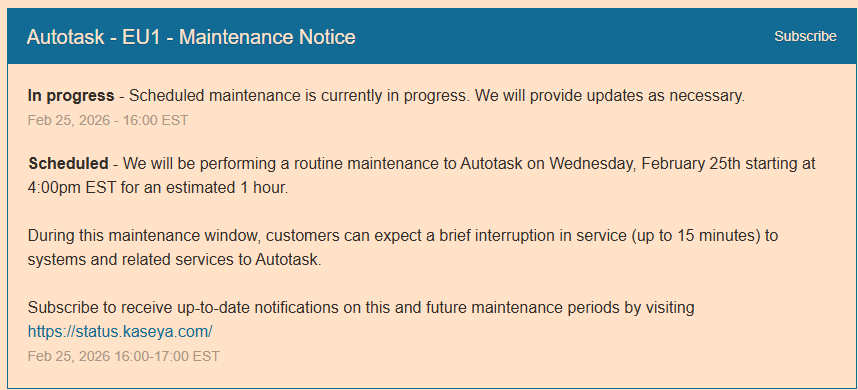
These errors are caused when Autotask is offline, as Autotask has been a number of times for pre-planned maintenance over the past few weeks.
We did recently add logic to MSPintegrations to elegantly handle outages from Autotask, but that is apparently not working in every circumstance. Thanks for providing the examples - we’re going to review the specifics and ensure the system works as intended the next time Autotask is unavailable.
When this is working as designed, you’ll see your MSPintegrations emails pause mid-way through until Autotask is available, and then they’ll pick right up where they left off.
Just adding to the topic as it does look like AT was offline last night… i also received about 7 or 8 warnings about no XML document.
Here are a few IDs, just in case you need multiple examples:
(id 1771902856176000wws4)
(id 1771902871795000wwyv)
(id 1771903249610000x0gk)
Thanks, all, for continuing to report these. We’ve reviewed each and identified a few more edge-cases of how Autotask acts when it’s offline. It’s challenging to test these until Autotask is offline again, so we’ll push these updates and then wait and see if anything else falls through the cracks.
You are the best! Thanks for your support in pointing these out!
Good news. With the outage this past Saturday, it looked like it successfully paused it.
There was just the single alert, and no follow-up that it was resumed, but when looking at the console I don’t see any errors.
Any thoughts to flagging these in the console somehow? Here’s the reason why: Ultimately I’m glad just to make sure they did process, but unless I’m actively checking the console during the outage, you don’t know how many messages have been impacted. The log looks like it shows the time the original message came in and not the time it was reprocessed. That means I have no way of knowing how many tickets were updated.. if a customer follows up and asks why we didn’t respond sooner (for example with an SLA), then it would be nice to be able to answer with “there was a Kaseya outage for {x period of time}” kind of thing.
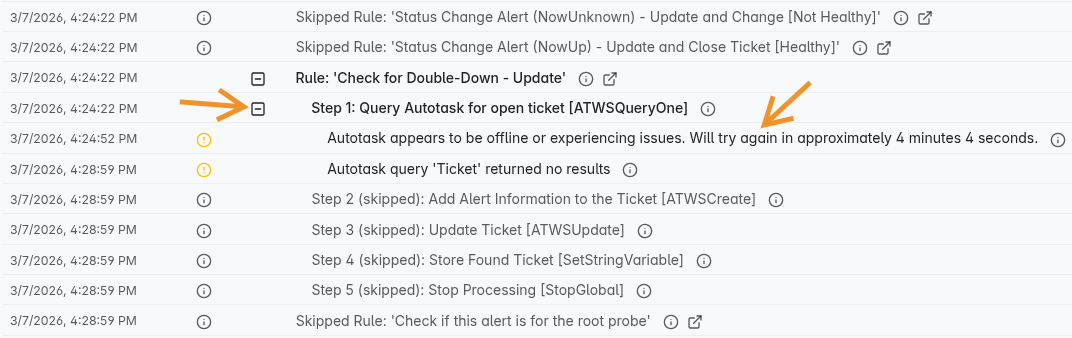
I got this alert 3/7 @ 7:25pm so I looked at the processing log for the incoming email closest to that. I think I see where it was held up (there is a warning icon and then a 4 minute gap).
Really glad to hear the pause/retry worked as expected during Saturday’s outage, and this is great feedback!
Let me first clarify what’s happening behind the scenes, and then I’d love to hear your thoughts on what would make it more visible for you.
How the system handles Autotask outages:
When any Autotask API call fails in a way that indicates Autotask is offline, the system:
Pauses the affected workflow for ~5 minutes
Logs a note to that message’s history indicating the Autotask API appeared to be offline
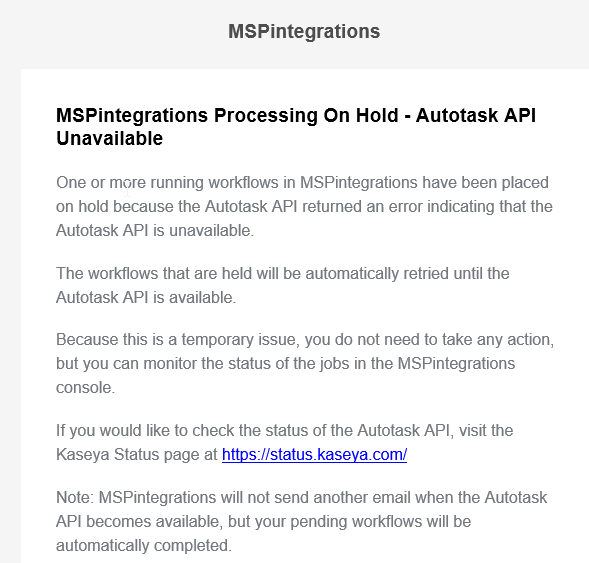
Sends you an email notification (more on this below)
Retries automatically, repeating this cycle until Autotask comes back online
Once Autotask is back online, the next retry succeeds and the workflow continues as normal. If the outage was lengthy, you’d see a series of log entries, one roughly every 5 minutes, in the affected history records.
A note on email notifications:
The email notification is rate-limited at the account level, meaning you’ll receive at most one notification every 5 minutes regardless of how many messages are affected. So if 100 messages are paused during an outage, you won’t get 100 emails, you’ll get one email roughly every 5 minutes until Autotask comes back online. The goal is to keep you informed without flooding your inbox.
You can view the per-message logs by expanding the step in the history:
Also worth noting: while a message is in this retry loop, it will show as “In Progress” and will appear highlighted in the history view, so there is some visual differentiation already in place.
Your suggestion about adding visual indicators to make outage-affected records easier to identify is great, and we’ll take it back to the roadmap. In the meantime, does the information above help clarify what’s available today? We’d love to hear any additional thoughts you have on what would make this more useful for you!
Yup… that makes sense on the back end what it is doing. That retry message is good to see when it’s stuck in the processing loop. Thanks for considering the visual indicator which would be used after the fact (since the message itself will no longer be processing and have that countdown in it)
Hate to visit this again, but had 4 errors go through last night that didn’t queue up and retry. Not sure if the format for the detection has changed, or something else, but I know you had to juggle this a few times before.
The timeline is as follows (times are in Central European Summer Time, GMT+2):
Monday 22:04 - Exception: looks like we got no XML document MSPintegrations
I think we found the issue. The system was correctly checking if Autotask was offline before making API calls. In this case, the system correctly blocked and retried the processing. If the Autotask API became unavailable after the check, then the API call was attempted. If the actual attempt failed, the system did not correctly intercept that and retry it. This is why most of the API calls were correctly blocked, but some were not.
We’ll be pushing a fix out in the next few days that includes logic to correctly interpret failures of both kinds (instead of just the first kind).
Wanting to keep all of the AutoTask Errors together for now, we got this error last week. I missed it at first thinking it was the offline issue, but it wasn’t: https://console.us1.mspintegrations.com/#/email/history/1775695304333003k15r
Exception Message: Exception: The enumeration TenantFeatureData can be indexed up to 69 but you supplied 70.
I just reprocessed the same message and it went through correctly, so while it may have been transient, that error specifically said that it wouldn’t attempt to reprocess it.



 Thanks for getting the rest of working no matter what!